 Hire Angular Developer
 Hire React
Developer
 Hire Flutter Developer
 Hire Bootstrap Developer
 IOS app developer
 React Native
developer
 Wearable App Development
 Cross-Platform
Developer
 IoT App Developer
 Hire Node JS
Developer
 Hire PHP
Developer
 Hire Laravel Developer
 Hire CI
Developer
 ASP.Net developer
 Vue.js Developer
 Java App Development
 Python Developer
 Hire Full Stack Developer
 Hire MEAN Stack Developer
 Hire MERN Stack Developer
 Android app developer
 Low Code App Developer
 NFT Marketplace Developer
 Metaverse Developer
 Machine Learning Chatbots
Developer
 Telemedicine App
 Remote Monitoring System
 Electronic
Medical Records
 Hotel Room
Booking App
 Medical Billing
Software
 Hospital
Management System
 Health
Information Exchange
 Medical Legal Case
Management
 Healthcare
Marketplace
 DICOM Viewer
 Food Ordering &
Delivery
 Event & Show Booking App

Building Healthcare SaaS That Hospitals Can Trust: 7 Critical Features Beyond Appointment Booking
Healthcare technology is often introduced through a simple promise: make it easier for patients to book appointments, consult doctors, and access medical information.
But building a healthcare platform that hospitals and clinics can actually depend on requires much more than an appointment calendar.
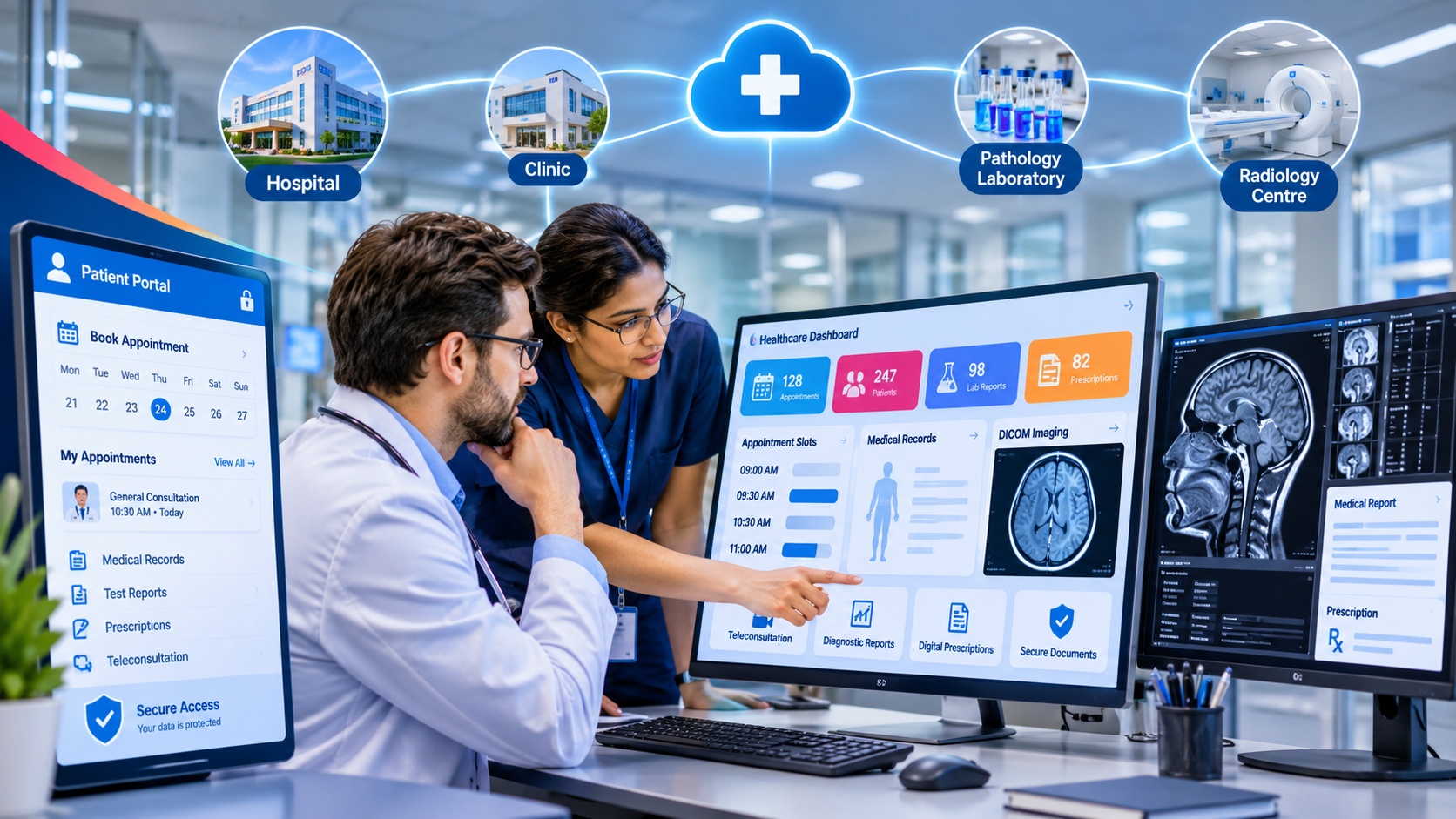
A patient may book an appointment online, but what happens when two patients select the same time slot? Can a doctor access an X-ray without switching applications? Can a pathology centre securely share reports with the treating clinic? Are prescriptions generated accurately? Can administrators trace who accessed or modified a patient's records?
These are not minor product enhancements. They are fundamental requirements of a reliable healthcare software system.
Healthcare platforms operate in an environment where information accuracy, privacy, availability, and patient safety matter. A software failure can create more than an inconvenient user experience. It can interrupt clinical workflows, delay decisions, expose sensitive information, or reduce trust between patients and providers.
That is why healthcare SaaS development requires a different level of architectural planning.
The goal is not simply to digitize appointments. It is to connect the complete healthcare journey through a secure, dependable, and well-integrated platform.
Why Healthcare SaaS Is More Complex Than a Standard Booking Application
A typical booking application manages users, available slots, confirmations, and notifications.
A healthcare platform may need to coordinate several independent organizations and professional roles:
Patients accessing appointments, prescriptions, and medical reports.
Doctors reviewing patient information and conducting consultations.
Clinics managing schedules, staff, and patient visits.
Pathology centres uploading laboratory reports.
Radiology centres sharing medical images and diagnostic information.
Administrators managing access, configuration, and operational records.
Each participant has different responsibilities and access requirements.
For example, a radiology centre needs to upload imaging studies, while a doctor needs to review the relevant images. A patient may need access to an approved report, but should not automatically receive administrative access to the entire system.
The platform must coordinate these interactions without treating every user as having the same permissions or responsibilities.
This is where thoughtful healthcare software architecture becomes essential.
1. Intelligent Appointment Scheduling With Real Slot Locking
Online appointment booking seems straightforward until multiple patients try to reserve the same time.
Imagine a doctor has one appointment slot available at 10:00 AM. Two patients open the booking page at nearly the same moment. Both see the slot as available and attempt to confirm their appointments.
If the application only checks availability when the page loads, both booking requests may succeed.
This creates a double-booking problem.
A reliable scheduling system needs to manage slot availability at the server and database level.
How a slot-locking workflow works
A practical implementation may follow this sequence:
A patient selects an available appointment slot.
The backend checks the current slot status.
The system temporarily locks the slot for a limited period.
Other booking requests cannot reserve the same slot during that lock.
The patient completes the required confirmation or payment step.
The appointment is confirmed, or the temporary lock expires and the slot becomes available again.
This process should use atomic database operations, appropriate transaction handling, and concurrency controls.
A temporary lock also needs an expiry mechanism so that abandoned booking attempts do not leave slots unavailable indefinitely.
The result is a more reliable scheduling experience for patients, doctors, and clinic administrators.
Important: A five-minute slot lock is one implementation approach highlighted in the LinkedIn project. The ideal lock duration depends on the booking workflow, confirmation requirements, and payment process.
2. Built-In DICOM Viewing for Medical Imaging
Medical imaging is an important part of modern diagnosis.
Radiology centres produce imaging studies such as X-rays, CT scans, and MRI scans. These studies are commonly exchanged using DICOM (Digital Imaging and Communications in Medicine), a standard for medical imaging information.
A platform that only supports ordinary image uploads may not provide the functionality clinicians need to review medical imaging effectively.
A DICOM-enabled platform can provide a more integrated experience.
What a DICOM viewer can support
Depending on the viewer and its implementation, clinicians may be able to:
Open imaging studies within the platform.
Navigate individual images and series.
Zoom, pan, and adjust image presentation.
Review relevant study information.
Compare images where supported.
Access imaging associated with the appropriate patient record.
The key advantage is workflow continuity.
Instead of downloading files, opening separate applications, and searching for the relevant patient record, authorized users can access imaging within the connected healthcare environment.
Why integration matters
A DICOM viewer is not simply an image gallery.
It needs to work with patient identity, study identifiers, permissions, and medical-record workflows. The platform must also handle large imaging datasets efficiently.
For production environments, architecture decisions around storage, retrieval, performance, access control, and interoperability should be considered from the beginning.
3. Automated Prescriptions With Digital Signatures
Prescriptions are an essential part of the patient-care process.
When prescriptions are created manually, clinics may face repeated data entry, inconsistent formatting, document management challenges, and difficulty retrieving historical records.
A digital prescription workflow can connect the consultation process with structured prescription information.
A typical digital prescription workflow
The doctor opens the appropriate patient record.
The doctor enters the diagnosis and prescription details.
The system generates a structured prescription document.
The authorized clinician reviews and signs the document using the supported digital-signature process.
The prescription is stored against the relevant patient and consultation.
The patient receives access through the appropriate portal or delivery mechanism.
Why digital signatures require careful implementation
A signature image placed on a PDF should not automatically be treated as a legally valid digital signature.
The appropriate signing method depends on the jurisdiction, applicable electronic-signature requirements, identity verification, and the type of document.
A production healthcare platform should define:
Who is authorized to sign.
How signer identity is verified.
How signed documents are protected from unauthorized changes.
How the signature and document history can be verified.
How corrections and replacements are recorded.
The objective is to make prescriptions easier to generate and retrieve without weakening clinical accountability.
4. Integrated Teleconsultation With Automated Meeting Links
Virtual consultations can make healthcare services more accessible, particularly when patients and doctors cannot meet physically.
However, teleconsultation should not be treated as an isolated video-call feature.
It should be connected to appointment scheduling and patient records.
For example, after an appointment is confirmed, the system can generate a consultation meeting link and associate it with the relevant appointment.
A connected workflow may include:
Appointment confirmation.
Automatic meeting-link generation.
Patient and doctor notifications.
Scheduled consultation access.
Consultation status management.
Storage of relevant consultation records, where appropriate.
This reduces the need for clinic staff to manually create and share meeting links for every appointment.
Integration also helps ensure that the correct patient and doctor are associated with the scheduled consultation.
Privacy, authentication, access permissions, and secure communication should be considered when selecting and implementing the video-conferencing service.
5. Intelligent Medical Document Search
Healthcare organizations generate large amounts of information.
Patient histories, laboratory reports, prescriptions, diagnostic documents, and clinical notes may be stored across multiple records and formats.
Finding the right information at the right time can become difficult when document collections grow.
A medical-document search system can help authorized users retrieve relevant information more efficiently.
What intelligent document search can do
Depending on the technology and data-processing pipeline, it may support:
Searching indexed document content.
Finding reports using relevant patient or study information.
Extracting searchable text from supported document formats.
Applying filters based on dates, document categories, or other metadata.
Searching within authorized collections of medical records.
AI-assisted search can also help users locate information using natural-language queries rather than requiring exact document names.
However, healthcare search must be designed with additional safeguards.
Search results should respect user permissions and patient-record boundaries. A user must not gain access to another patient's information simply because a search query matches it.
AI-generated summaries or extracted information should not silently replace original clinical documents. Users need a way to inspect the underlying source information and verify important details.
6. Bulk Report Upload With Accurate Patient Mapping
Pathology and diagnostic centres may need to upload large batches of medical reports.
Uploading each document individually can consume significant administrative time, especially when a centre processes a high volume of reports.
Bulk upload functionality can simplify this process.
But uploading multiple files is only half the challenge.
Each report must be associated with the correct patient record.
How a bulk-upload workflow can work
A robust implementation may include:
The authorized user selects multiple reports.
The system validates file types and basic document requirements.
Patient identifiers and available metadata are extracted.
The system attempts to match each report to the correct patient record.
Uncertain or incomplete matches are flagged for manual verification.
Authorized users review and confirm the mappings.
Reports are stored and made accessible according to configured permissions.
Why patient mapping deserves special attention
Incorrectly attaching a report to a patient record can create serious clinical and operational consequences.
For this reason, automatic matching should not blindly accept uncertain results.
A well-designed system should account for duplicate names, incomplete identifiers, inconsistent formats, and missing patient details.
It should also maintain an upload history so administrators can investigate processing errors and corrections.
Automation should reduce repetitive work while preserving human verification wherever patient identity is uncertain.
7. Security, Permissions, and Audit Trails
Security is not an optional feature that can be added after a healthcare platform is completed.
It needs to influence architecture, data handling, user management, and operational workflows from the beginning.
A healthcare SaaS application may store highly sensitive information, including patient identities, medical reports, prescriptions, consultation details, and diagnostic images.
A platform must therefore control not only who can log in, but also what each user can see and do.
Role-based access control
Different users should receive access according to their responsibilities.
For example:
| User role | Typical access requirements |
|---|---|
| Patient | Own appointments, approved reports, prescriptions, and relevant records |
| Doctor | Assigned patient records and authorized clinical workflows |
| Clinic administrator | Clinic operations, appointments, and authorized administrative records |
| Pathology centre | Relevant report-upload and diagnostic workflows |
| Radiology centre | Authorized imaging-upload and study workflows |
| Platform administrator | Platform configuration and controlled administrative functions |
These are illustrative permissions. Actual access policies must be defined according to the organization's clinical workflows, contracts, and applicable regulations.
Audit trails
A reliable healthcare system should maintain records of important activities.
Depending on the application, this may include:
User login and access events.
Patient-record access.
Document uploads and downloads.
Prescription creation and modification.
Appointment changes.
Administrative actions.
Permission and configuration changes.
Audit logs help organizations investigate incidents, understand system activity, and support accountability.
They should be protected against unauthorized modification and designed with appropriate retention and access policies.
Encryption and secure infrastructure
Security planning should include:
Encryption in transit.
Appropriate encryption at rest.
Secure authentication and session management.
Strong authorization checks.
Protected document storage.
Backup and recovery procedures.
Vulnerability management.
Monitoring and incident-response processes.
A cloud provider or security feature alone does not automatically make an application compliant.
Healthcare Compliance Must Be Designed Into the Platform
Healthcare software companies often use terms such as HIPAA-compliant, secure, and healthcare-ready.
But compliance is not a marketing label that can be applied simply because an application stores medical records securely.
For organizations subject to HIPAA in the United States, compliance involves applicable administrative, physical, and technical safeguards, along with organizational responsibilities and contractual requirements.
Depending on the platform and deployment model, this may involve:
Risk analysis and risk management.
Access controls.
Audit controls.
Transmission security.
Business Associate Agreements where required.
Workforce policies and training.
Incident response and breach procedures.
Appropriate vendor and infrastructure assessments.
Other countries have their own privacy and healthcare-data requirements. For example, organizations operating in India need to evaluate applicable Indian data-protection and healthcare regulations.
The exact obligations depend on the organization, services, data, location, and role in processing that information.
A technically secure platform is important, but compliance requires more than technical implementation. It requires appropriate policies, operational controls, documentation, and ongoing assessment.
The Architecture Behind a Connected Healthcare Platform
The seven capabilities described above should not be developed as unrelated features.
They need to share a consistent foundation.
A typical healthcare SaaS architecture may include the following layers:
1. User and access layer
Separate patient, doctor, clinic, diagnostic-centre, and administrative interfaces provide role-appropriate experiences.
2. Application and business-logic layer
This layer handles appointments, consultations, prescriptions, patient records, report management, and administrative workflows.
3. Integration layer
APIs and integration services connect external video platforms, diagnostic systems, imaging services, notifications, and other healthcare applications.
4. Data and document layer
Structured patient information, appointment records, documents, prescriptions, and imaging references require appropriate storage and retrieval mechanisms.
5. Security and monitoring layer
Authentication, authorization, audit logging, encryption, backups, and operational monitoring support the entire platform.
The exact technology stack can vary. What matters is that the architecture supports reliable data exchange, clear ownership of records, secure access, and future expansion.
What Does a Healthcare SaaS Project Require Beyond Coding?
A technically capable development team still needs to understand the healthcare environment.
Before development begins, the project should address several important questions:
Which organizations will use the platform?
What information can each organization access?
How are patients identified across different providers?
What happens when patient details do not match?
How are appointment conflicts prevented?
Which imaging standards and formats must be supported?
How are prescriptions reviewed and signed?
What are the document-retention requirements?
Which integrations are necessary?
What security and compliance responsibilities apply?
These questions influence database design, API architecture, permissions, workflows, and deployment decisions.
They are much more expensive to correct when discovered late in development.
A Real-World Healthcare SaaS Development Example
A healthcare platform described in Web N Soft Solution's LinkedIn project update connected five major participant groups:
Patients.
Doctors.
Clinics.
Pathology centres.
Radiology centres.
The published project update highlighted several implementation capabilities:
Five-minute appointment-slot locking.
An integrated DICOM viewer for medical imaging.
Automated PDF prescriptions with digital signatures.
Zoom consultations with automatically generated meeting links.
AWS-powered search within medical documents.
Bulk report uploads with automated patient mapping.
The post also reported a 12-person development team and a 26-week delivery timeline.
These are the details reported in that particular project update, not universal estimates for every healthcare SaaS implementation.
The larger lesson is that a connected healthcare platform requires multiple engineering disciplines to work together: scheduling, document management, medical imaging, integrations, access control, and user experience.
Its value comes from connecting these capabilities into a coherent clinical and administrative workflow.
Final Thoughts: Trust Is the Foundation of Healthcare Software
A healthcare platform can have an impressive interface, a long list of features, and modern technology.
But healthcare organizations need something more important: confidence that the system will handle patient information, appointments, documents, and clinical workflows responsibly.
Reliable appointment scheduling, integrated medical imaging, digital prescriptions, teleconsultations, intelligent document retrieval, and secure access controls are not independent selling points.
Together, they create the foundation of a connected healthcare experience.
The best healthcare SaaS products are not simply applications that digitize existing processes. They are carefully engineered platforms that help healthcare providers coordinate services, access information, and manage their responsibilities with greater consistency.
At Web N Soft Solution, we believe healthcare technology requires a combination of thoughtful architecture, domain understanding, secure engineering, and user-focused product development.
If you are planning a healthcare SaaS platform, clinic management system, diagnostic integration, or custom medical software, the most important decisions should happen before the first line of code is written.
Because in healthcare technology, building the feature is only part of the responsibility. Building it in a way people can trust is what truly matters.
Website: https://www.webnsoftsolution.com
Email: info@webnsoftsolution.com